WOMBO Dream - AI Art Generator
Wombo Studios IncArt & Design
3.710.66K Reviews
- Version
- 7.0.9
- Installs
- 10.00M
- Age Rating
- Everyone
Screenshots
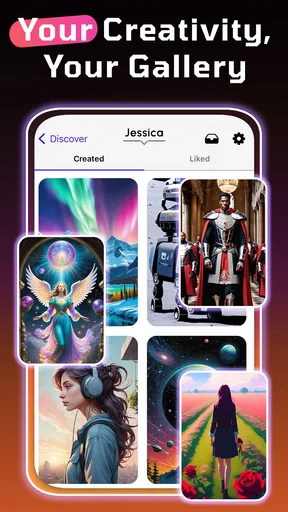
Our Review of WOMBO Dream - AI Art Generator
 Analysis by Appyee
I approach AI art apps with curiosity, but also with a practical question: what happens to the ideas and images I bring into them? WOMBO Dream - AI Art Generator is built for turning a written idea into an image, so the prompt is both the starting point and the most personal part of the process. I enjoy that directness, though it also makes me pause before entering anything private or sensitive. I would treat it as a creative sketchbook, not a place for confidential material.
Trust starts with what you choose to share
In everyday use, the clearest choice is the prompt itself: I decide what to type, how specific to make it, and whether the idea is something I am comfortable submitting to an AI art tool. For a fantasy landscape, a playful mascot concept, or a mood-board image, that feels straightforward. For a real person’s private details, an unreleased client brief, or information I would not want handled by an online service, I would keep the prompt general or use another workflow.
I also separate creating from publishing. Sharing an image is a different decision from generating it, and I prefer to look at the finished result before sending it anywhere. That small pause helps me check whether the picture says what I intended and whether it contains anything I would rather keep to myself. It is an easy habit that gives me more control without interrupting the fun.
Practical choices before a prompt goes in
When I want a personal image, I describe the visual idea rather than supplying identifying details. “A cozy reading nook on a rainy evening” gives the generator enough direction for an experiment without exposing anything about my home or routine. If I am making a concept for someone else, I use broad visual traits instead of names or private context. The result may be less exact, but the trade-off is sensible when privacy matters.
It is also worth thinking about what you plan to do with an image before you create it. A quick picture for a chat or a personal inspiration board has different demands from artwork meant to represent a business or become part of a finished design. I would check the app’s current terms and choices for any intended commercial or public use rather than assuming a generated result is automatically suitable for every purpose.
Getting Started with WOMBO Dream
First things first, downloading WOMBO Dream is a breeze. Available on both Android and iOS, it’s just a tap away. Once you have it on your device, the interface greets you with a sleek and user-friendly design. No fuss, no confusion—just straight into the action.
Creating Your First Masterpiece
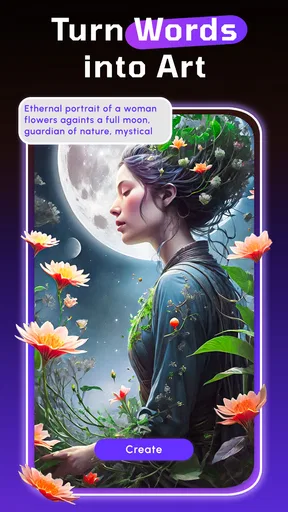
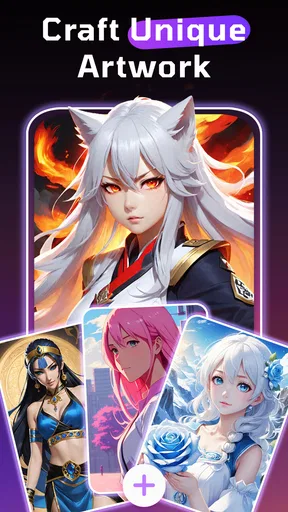
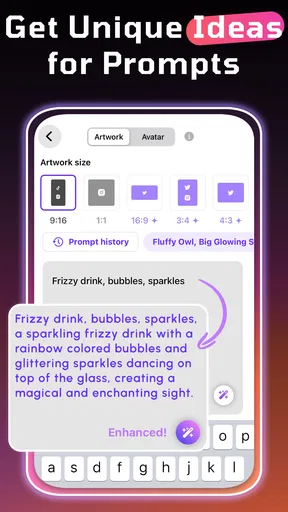
Now, this is where the fun begins. You start by typing in a prompt. It could be anything from "a serene landscape at sunset" to "a futuristic city in space." The AI then takes over, weaving its magic to create an artwork that matches your description. I was blown away by how quickly the app generated images that were not only unique but also visually stunning.
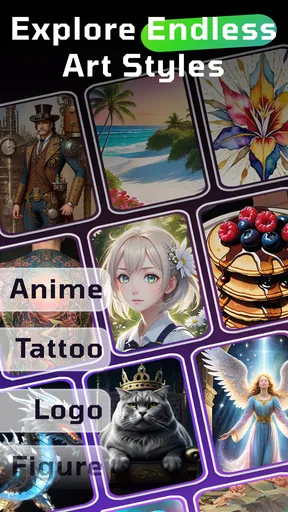
The app offers various styles to choose from, like "Realistic," "Cartoon," and "Abstract." This means you can experiment with different looks to find the one that best suits your vision. The process is as simple as selecting your style and letting the AI do its thing. Trust me, watching your words transform into art is oddly satisfying.
Making prompts work harder
One useful habit is to build a prompt in layers: name the subject first, then its setting, mood, and a few visual cues. “A red bicycle” leaves the app a lot of room to guess; “a red bicycle leaning against a flower-covered stone wall in soft morning light” gives the image a clearer scene to work with. I avoid stuffing in a long list of adjectives, because conflicting directions can make the result feel muddled rather than detailed.
If a first result misses the mark, I change one part of the wording at a time. Swapping the setting while keeping the subject and mood gives me a fair sense of what influenced the image. Changing the style and the whole prompt at once may still be entertaining, but it is harder to learn from. This small, deliberate loop makes experimentation feel less random and helps me find a version worth saving or sharing.
Exploring Art Styles
Diving deeper, I found the style options to be a playground for creativity. Whether you want something that mimics a Monet painting or a vibrant pop-art piece, WOMBO Dream has you covered. The variety means you can keep creating without ever feeling stuck in a creative rut.
"Art enables us to find ourselves and lose ourselves at the same time." - Thomas Merton
This quote couldn't be more fitting as I explored the app. Each style opened up new pathways for me to express ideas I hadn’t even considered before. The possibilities felt endless, and I was hooked.
Choosing a style for the job
I get the most from style choices when I treat them as different interpretations of the same idea, rather than as a menu of guaranteed outcomes. A cartoon-like treatment can make a whimsical character feel readable, while a more realistic direction may suit a landscape reference. When I am undecided, I keep the prompt stable and try a couple of looks; that makes it easier to compare the mood and composition instead of judging several changes at once.
That said, generated art is not a substitute for exact visual control. If I need a particular logo shape, precise lettering, a consistent character across multiple images, or careful placement of several objects, I would use a drawing or layout app after the experiment—or choose a conventional design tool from the beginning. Dream is most appealing when I want an idea interpreted, not when I need every pixel to obey a specification.
A small everyday use case
One realistic use is making a quick visual for a personal project: I might want a cover image for a playlist, a theme for a journal page, or a reference for a craft I plan to make. I can start with the mood and subject, then try a different style if the first version feels too serious or too busy. Even if the image is not the finished asset, it can help me settle on a direction before I spend time drawing or arranging anything by hand.
For a more involved project, I would save the strongest result as inspiration and make the final adjustments elsewhere. That division of labor is important: the generator is good at surprising me with visual possibilities, while a manual editor is better for cropping precisely, adding readable text, or making a series look consistent. Using both avoids expecting one app to be a complete art studio.
Sharing Your Creations
Once you've crafted your masterpiece, sharing it with the world is just a tap away. The app integrates smoothly with social media platforms, so you can easily boast about your creation to friends or art communities. I found this feature particularly engaging. It’s not just about creating art; it’s about being part of a global community of creators.
Sharing with a little care
I think of sharing as an optional last step, not the point of every creation. Before posting, I check the image at full size, especially if I plan to use it as a profile picture, a presentation visual, or a gift. AI-generated details can look charming at a glance but odd when enlarged, and an image that works as a small thumbnail may not hold up as a print or a polished public-facing design.
If I am making something for a group chat or a casual post, an imperfect detail is usually part of the amusement. If the image represents a project or another person, I would be more selective and explain that it is AI-generated when that context matters. The app makes it easy to share, but deciding where and how an image belongs is still my responsibility.
Who will enjoy it—and who may not
I would recommend this kind of tool to someone who has ideas but does not draw, or to an artist who wants a fast way to explore unusual visual directions. It is also a good fit for low-stakes creative play: testing a mood, inventing a fantasy scene, or making an image to spark a conversation. The low barrier to entry matters more here than precise control.
I would steer away from it if your main goal is to produce technically exact artwork, edit photographs in detail, or build a dependable set of matching illustrations. Those jobs call for tools with direct brushes, layers, typography controls, or repeatable design systems. If you simply want to sketch by hand, a drawing app gives you more say over every mark and may feel more satisfying than prompting an AI.
Price, access, and expectations
The app is free to start, while in-app purchases range from $3.99 to $199.99 per item. I would explore the basic workflow before paying for anything and consider whether I actually need the extra option in front of me. A broad purchase range makes it especially sensible to read the terms shown in the app carefully, confirm what a particular purchase includes, and avoid treating a prompt to upgrade as proof that I need to do so.
It is an art-and-design app from Wombo Studios Inc, and it is rated for Everyone. Its average rating is 3.7 from around 526,000 ratings, with about 11,000 written reviews and over 10 million installs. Those figures suggest a widely tried app with mixed reactions, which matches my own balanced view: the quick creative payoff is appealing, but results and expectations can vary. The current version is 7.0.4, and it requires Android 7.0 or later.
Room for Improvement?
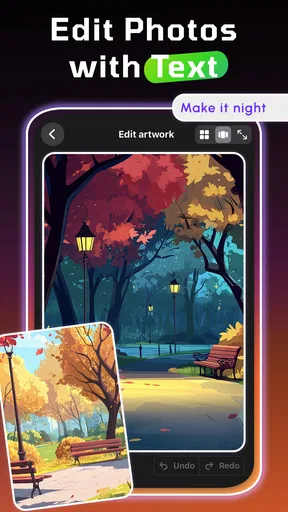
As much as I loved the app, there are a few things that could enhance the experience. For one, while the app is intuitive, more detailed tutorials could help beginners get the most out of it. Also, offering more customization options would be a welcome addition. Imagine tweaking the AI’s palette or adding personal touches to the generated art. It would be next-level awesome.
Keeping expectations grounded
The main friction is that a prompt is a suggestion, not a precise instruction sheet. I may know exactly what I pictured and still get an image with a different balance, an unexpected detail, or a mood that does not quite fit. That can be entertaining when I am exploring, but frustrating when I need a specific result quickly. I try to judge it as a generator of possibilities rather than a reliable way to reproduce a mental image exactly.
There is also a practical difference between a fun result and a finished piece. Generated images can be useful as inspiration, but I still check composition, small details, and suitability before relying on them. Anyone who expects a full set of editing and illustration tools in the same place may find the workflow limited; pairing it with a dedicated editor is the more realistic approach.
Final Thoughts
In a nutshell, WOMBO Dream - AI Art Generator is a delightful tool for anyone looking to dabble in digital art. It's easy to use, incredibly fun, and it opens up a world of creative possibilities. Whether you’re an art novice or a seasoned pro, this app offers something for everyone.
So, why not give it a whirl? Dive into your imagination and see what masterpieces await. With WOMBO Dream at your fingertips, the only limit is your creativity.
My cautious verdict
My recommendation is enthusiastic for experimentation, but measured for anything important. I like the immediate path from a sentence to a visual idea, and I would keep it on hand for playful concepts, inspiration, and casual sharing. I would not rely on it for sensitive prompts, exact design work, or a polished deliverable without checking the result and finishing it elsewhere.
That balance is what makes the app worth considering: it can help a non-artist get an image out of an idea, and it can give an experienced creator a quick starting point, but it does not remove the need for judgment. Start with a harmless prompt, see whether its interpretation suits your taste, and decide from there whether its creative trade-offs fit the way you want to work.
Verdict
Strengths of WOMBO Dream - AI Art Generator
- Easy-to-use interface for beginners.
- Wide variety of art styles available.
- Generates high-quality images fast.
- No artistic skills required to create art.
- Regular updates with new features.
Limitations of WOMBO Dream - AI Art Generator
- Limited customization for advanced users.
- May require in-app purchases for extras.
- Occasional glitches in image rendering.
- Requires a stable internet connection.
- Ads can be intrusive at times.
Similar Picks in This Category
View All
Canva: AI Photo & Video Editor
Canva4.8

PENUP – Drawing-sharing SNS
Samsung Electronics Co., Ltd.4.5

Crafto
Kutumb App4.6

Sketchbook
Sketchbook4.1

ibis Paint X
ibis inc.4.5

Adobe Express: AI Photo, Video
Adobe4.6
Frequently Asked Questions
What is WOMBO Dream and how does it work?
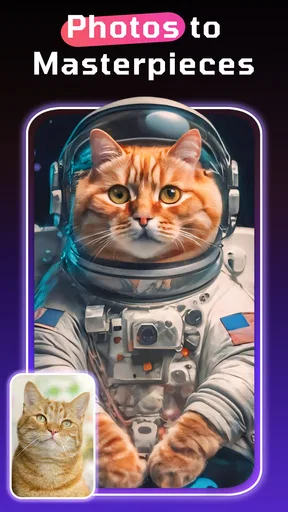
WOMBO Dream is an AI-powered art generator that transforms your photos and prompts into unique artworks. By using advanced algorithms, it creates stunning visual pieces by interpreting input data creatively. Simply upload a photo or describe your vision, and the app generates a customized artistic interpretation.
Is WOMBO Dream available for both Android and iOS devices?
Yes, WOMBO Dream is available for download on both Android and iOS platforms. You can find it on the Google Play Store for Android devices and the Apple App Store for iOS devices, making it accessible to a wide range of users who want to explore AI-generated art.
Are there any costs associated with using WOMBO Dream?
WOMBO Dream offers a free version with basic features. However, for users looking to unlock advanced features and higher-quality outputs, there is a premium subscription available. This subscription enhances your experience with additional styles and customization options.
Can I share or use the artworks created by WOMBO Dream?
Yes, you can share the artworks you create with WOMBO Dream on social media or use them for personal projects. However, it's important to review the app's terms of service regarding commercial use to ensure compliance if you intend to use the images for commercial purposes.
What makes WOMBO Dream different from other art generator apps?
WOMBO Dream stands out due to its intuitive interface and the high-quality, diverse art styles it offers. The app's AI is designed to push creative boundaries, providing users with surprisingly intricate and personalized pieces, unlike the more generic outputs from some other art generator apps.
